NCH Swift Sound Home
Home | Download | Purchase | Support | Products | SiteMap  

Express Rip CD Ripper

Extract audio from CDs in perfect digital quality

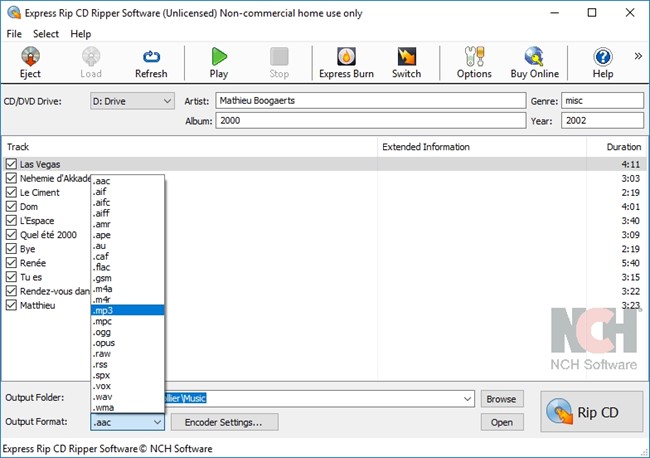
Express Rip is a free program for Windows that lets you extract digital audio tracks such as music directly from audio CDs to mp3 and wav audio files and save your hard drive. By using direct digital extraction, pure audio quality is maintained when you convert cd audio to mp3 and Express Rip is the fastest CD ripper in the world using proprietary optimizing systems. But don't believe us, try it for yourself. Click here to download now.

Express Rip is completely free.

We make Express Rip free in the hope you will like it so much you will consider purchasing Express Rip Plus which offers additional features for the audio professional including additional supported file formats and command line automation tools. For more information you can download the Express Rip Plus demo here or buy it here.

Express Rip is just one component of the NCH Swift Sound suite of audio software for business. If you have not done so already, please visit www.nch.com.au/software to download many other audio related programs.

Download Free Try Express Rip Plus Buy Express Rip Plus

Click here for Express Rip screenshots

See Screenshots >>>

Features
  • Perfect quality CD digital audio extraction (ripping).
  • Fastest CD Ripper available.
  • Extract audio from CDs to wav or mp3.
  • Extract many other file formats including wma, m4q, aac, aiff and more using Express Rip Plus
  • Save track information or 'tags' (including title, artist, album and more) to mp3 files or create custom information.
  • Also save tags to wave files using the CART and BWF methods. This is one of the few CD rippers that can do this.
  • Automatically link to an online database to obtain track and album name information.
  • Have complete control over mp3 encoding, including constant and variable modes at selectable bitrates.
  • Can be run from the command line for integration with other applications (Plus version).
  • Simple, easy to use interface
System Requirements
  • Windows 95/NT4/98/2000/Me/XP/2003/Vista.
  • CD-ROM or DVD disc drive.


Download Express Rip
Express Rip CD Ripping software can be downloaded by clicking on one of these links: Once download is complete run the file "ripsetup.exe" to install Express Rip. When the file has installed, please select Help to view (or print) the complete manual.
 
CD Ripping Software
Introduction
Features
Screenshots
System Requirements
Download Now
 - exe file
 - zip file
Pricing and Purchasing
Discussion Forum
Questions (FAQs)
Technical Support
 
 
Languages
auf Deutsch
en Español
en Français
 
 
Related Software
Sound Editor
Audio File Mixer
Professional DJ Software
Audio Recorder
CD/ DVD Burner
Sound File Converter
Audio Splitter
ID3 Tag Editor
Audio Stream Recorder
Vinyl to CD Converter
Sound Recording Software
More Audio Software
 
More Information...
For more information see:

  © NCH Swift Sound Top | Home